 08e53bcd48
* Fix AWG<-> mm2 conversions

Add an inverted dictionary and a lookup function from awg -> mm2. Also
do some minor refactoring. Both sides of the conversion table were
converted to strings, since '0000' and '2/0' are perfectly valid AWG
values.

* Update example ex02 with awg -> mm2 conversion

Show conversions for ex02, and make sure it displays conversions in both
directions. Rebuild the example files.

* Fix faulty conversion of non-(mm2,AWG) units

The parsing allows arbitrary units to be used for cable dimensions --
this might be valid units, e.g. square inches, or invalid, e.g. bananas.
We only allow conversion between mm2 and AWG, so check that the
gauge_unit is either of those before conversion. If not, pass through as
is.

* Fix AWG string casing in output

Convert e.g. 'awg, 'AwG' to upper case for consistent rendering. Leave
any other input gauge units as they were.

Co-authored-by: Daniel Rojas <github@danielrojas.net>
WireViz
Summary
WireViz is a tool for easily documenting cables, wiring harnesses and connector pinouts. It takes plain text, YAML-formatted files as input and produces beautiful graphical output (SVG, PNG, ...) thanks to GraphViz. It handles automatic BOM (Bill of Materials) creation and has a lot of extra features.
Features
- WireViz input files are fully text based
- No special editor required
- Human readable
- Easy version control
- YAML syntax
- Understands and uses color abbreviations as per IEC 60757 (black=BK, red=RD, ...)
- Optionally outputs colors as abbreviation (e.g. 'YE'), full name (e.g. 'yellow') or hex value (e.g. '#ffff00'), with choice of UPPER or lower case
- Auto-generates standard wire color schemes and allows custom ones if needed
- Understands wire gauge in mm² or AWG
- Optionally auto-calculates and displays AWG equivalent when specifying mm²
- Allows more than one connector per side, as well as loopbacks
- Allows for easy-autorouting for 1-to-1 wiring
- Generates BOM (Bill of Materials)
Note: WireViz is not designed to represent the complete wiring of a system. Its main aim is to document the construction of individual wires and harnesses.
Installation
WireWiz requires GraphViz to be installed in order to work. See the GraphViz download page for OS-specific instructions.
Installation of the WireWiz package and its Python dependencies can be done using pip after cloning the repository:
git clone <repo url>
cd <working copy>
pip3 install -e .
Examples
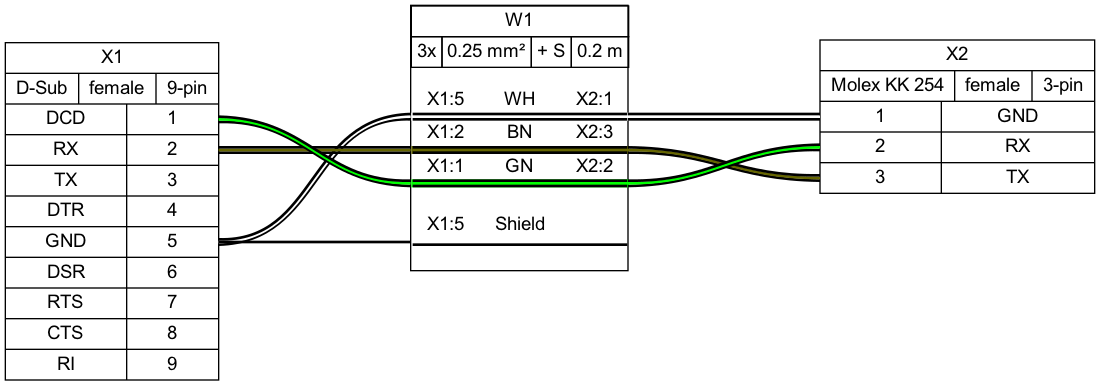
Demo 01
connectors:
  X1:
    type: D-Sub
    subtype: female
    pinout: [DCD, RX, TX, DTR, GND, DSR, RTS, CTS, RI]
  X2:
    type: Molex KK 254
    subtype: female
    pinout: [GND, RX, TX]

cables:
  W1:
    gauge: 0.25 mm2
    length: 0.2
    color_code: DIN
    wirecount: 3
    shield: true

connections:
  -
    - X1: [5,2,1]
    - W1: [1,2,3]
    - X2: [1,3,2]
  -
    - X1: 5
    - W1: s
Output file:
Bill of Materials (auto-generated)
Demo 02
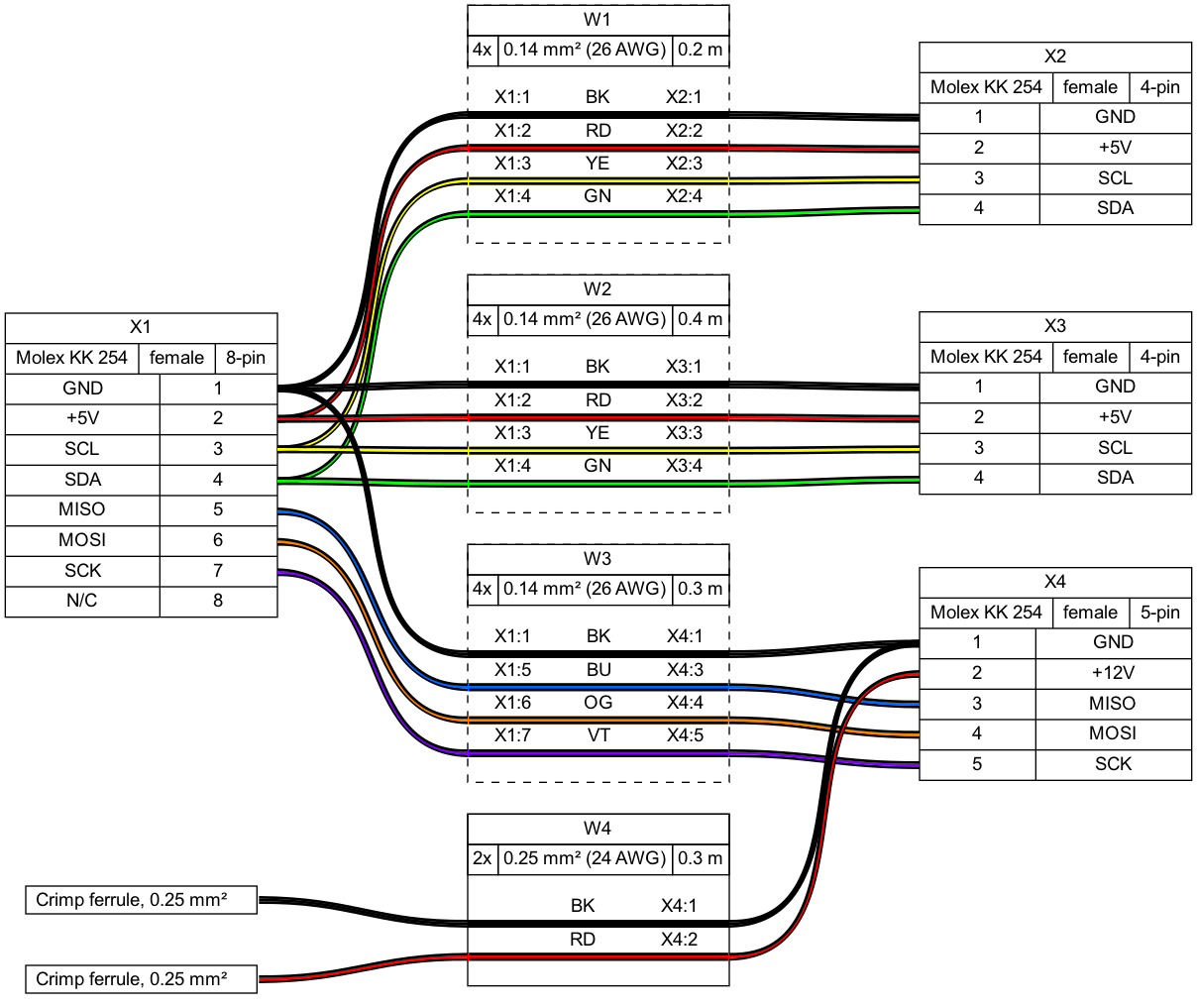
Tutorial and example gallery
See the tutorial page for sample code, as well as the example gallery to see more of what WireViz can do.
(Re-)Building the example projects
If you would like to rebuild all of the included demos, examples and tutorials, use the build_examples.py script:
./build_examples.py
Usage
$ wireviz ~/path/to/file/mywire.yml
This will output the following files
mywire.gv         GraphViz output
mywire.svg        Wiring diagram as vector image
mywire.png        Wiring diagram as raster image
mywire.bom.tsv    BOM (bill of materials) as tab-separated text file
mywire.html       HTML page with wiring diagram and BOM embedded
Status
This is very much a work in progress. Source code, API, syntax and functionality may change wildly at any time.
Requirements
Developed and tested using Python 3.7; might not work with older Python versions.
Ubuntu 18.04 LTS users in particular may need to separately install Python 3.7 or above, as that comes with Python 3.6 as the included system Python install.
License
GNU GPLv3