 476f85bcf5
This make it possible to append '-g' or '--groups' followed by
space separated group names to any CLI action command, and the
set of generated files affected by the command will be limited
to the selected groups ('examples', 'tutorial', and 'demos').
Default is all groups. A simple help text is added for each of
the arguments (action and groups) to improve the autogenerated
CLI help output.

This is a squash rebase of these commits:
- p ec29076 Make all actions honor the optional argument -generate
- s e3ad11a Move open_file_append() outside the if to avoid re-open
- s ba4b900 Avoid including readme in all file groups
- s 1ca8bd1 Simplify code
- s a9e7337 Rename some variables to better reflect their contents and relations
- s 58a54b2 Move test to include readme inside collect_filenames() function
- s f2a0db0 Improve status output by adding group name
- s d3b299b Rename -generate option to -g/--groups and add argument help
WireViz
Summary
WireViz is a tool for easily documenting cables, wiring harnesses and connector pinouts. It takes plain text, YAML-formatted files as input and produces beautiful graphical output (SVG, PNG, ...) thanks to GraphViz. It handles automatic BOM (Bill of Materials) creation and has a lot of extra features.
Features
- WireViz input files are fully text based
- No special editor required
- Human readable
- Easy version control
- YAML syntax
- UTF-8 input and output files for special character support
- Understands and uses color abbreviations as per IEC 60757 (black=BK, red=RD, ...)
- Optionally outputs colors as abbreviation (e.g. 'YE'), full name (e.g. 'yellow') or hex value (e.g. '#ffff00'), with choice of UPPER or lower case
- Auto-generates standard wire color schemes and allows custom ones if needed
- DIN 47100 (WT/BN/GN/YE/GY/PK/BU/RD/BK/VT/...)
- IEC 62 (BN/RD/OR/YE/GN/BU/VT/GY/WT/BK/...)
- 25 Pair Color Code (BUWH/WHBU/OGWH/WHOG/GNWH/WHGN/BNWH/...)
- TIA/EIA 568 A/B (Subset of 25-Pair, used in CAT-5/6/...)
- Understands wire gauge in mm² or AWG
- Optionally auto-calculates equivalent gauge between mm² and AWG
- Allows more than one connector per side, as well as loopbacks
- Allows for easy-autorouting for 1-to-1 wiring
- Generates BOM (Bill of Materials)
Note: WireViz is not designed to represent the complete wiring of a system. Its main aim is to document the construction of individual wires and harnesses.
Installation
WireWiz requires GraphViz to be installed in order to work. See the GraphViz download page for OS-specific instructions.
Installation of the WireWiz package and its Python dependencies can be done using pip after cloning the repository:
git clone <repo url>
cd <working copy>
pip3 install -e .
Examples
Demo 01
connectors:
  X1:
    type: D-Sub
    subtype: female
    pinlabels: [DCD, RX, TX, DTR, GND, DSR, RTS, CTS, RI]
  X2:
    type: Molex KK 254
    subtype: female
    pinlabels: [GND, RX, TX]

cables:
  W1:
    gauge: 0.25 mm2
    length: 0.2
    color_code: DIN
    wirecount: 3
    shield: true

connections:
  -
    - X1: [5,2,3]
    - W1: [1,2,3]
    - X2: [1,3,2]
  -
    - X1: 5
    - W1: s
Output file:
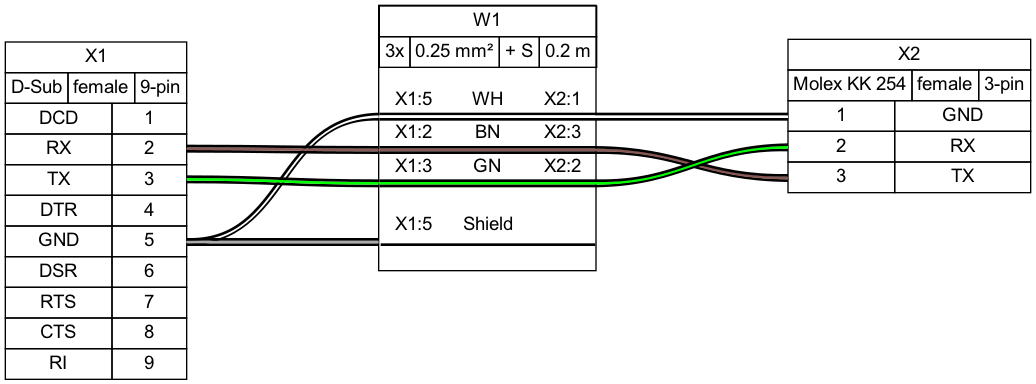
Bill of Materials (auto-generated)
Demo 02
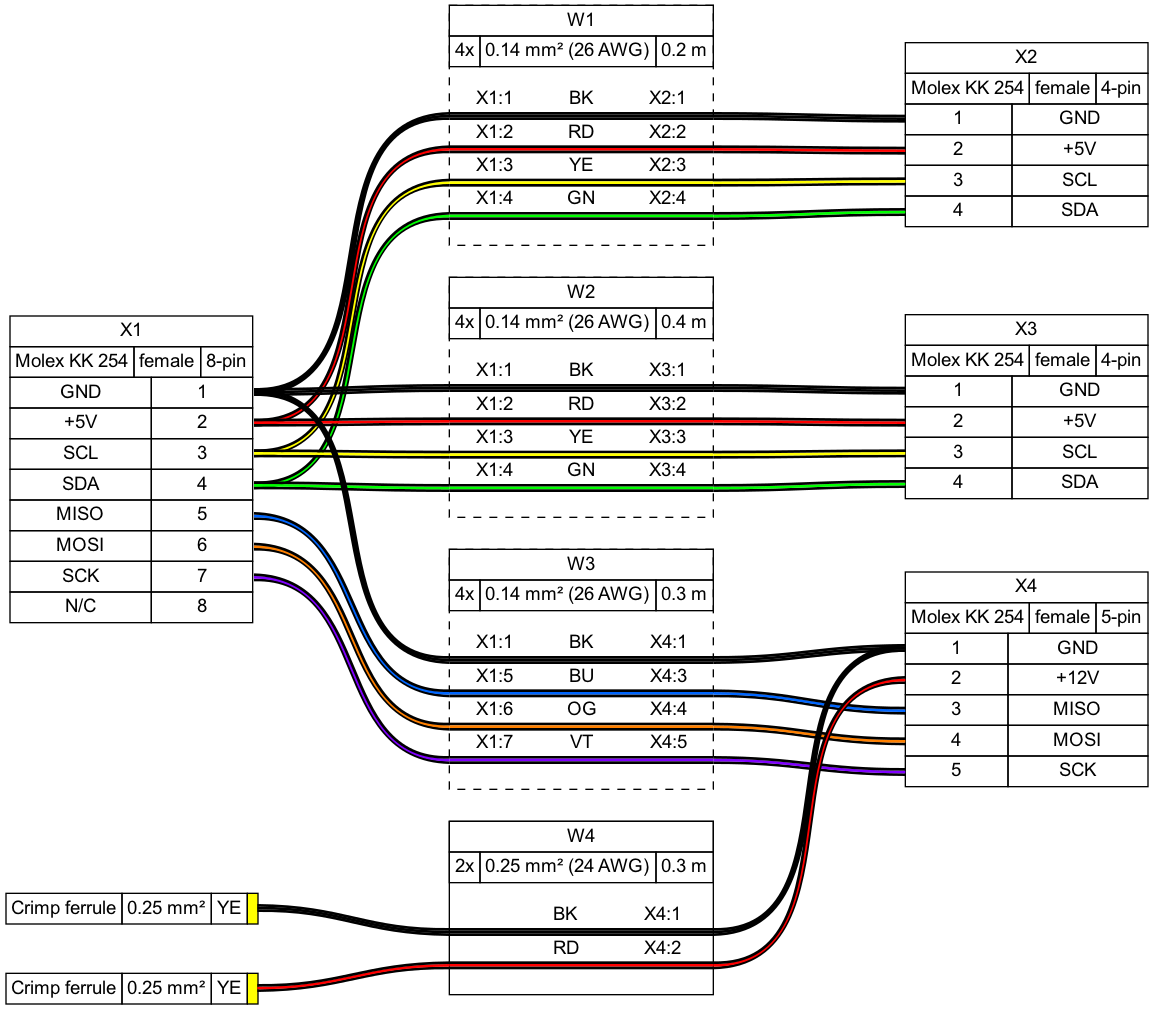
Tutorial and example gallery
See the tutorial page for sample code, as well as the example gallery to see more of what WireViz can do.
Usage
$ wireviz ~/path/to/file/mywire.yml
This will output the following files
mywire.gv         GraphViz output
mywire.svg        Wiring diagram as vector image
mywire.png        Wiring diagram as raster image
mywire.bom.tsv    BOM (bill of materials) as tab-separated text file
mywire.html       HTML page with wiring diagram and BOM embedded
(Re-)Building the example projects
If you would like to rebuild all of the included demos, examples and tutorials, use the build_examples.py script:
./build_examples.py
Changelog
See CHANGELOG.md
Status
This is very much a work in progress. Source code, API, syntax and functionality may change wildly at any time.
Requirements
Developed and tested using Python 3.7; might not work with older Python versions.
Ubuntu 18.04 LTS users in particular may need to separately install Python 3.7 or above, as that comes with Python 3.6 as the included system Python install.