 c33a19708c
Refactor connector node generation

Further refactor connector node generation

Rebuild demos

Generate gauge string inside Cable object

WIP: refactor cable node generation

Implement HTML indentation

WIP

More WIP

Remove old stuff, slightly simplify code

Outsource `gv_pin_table()`, simplify padding

Add TODOs

Outsource `set_dot_basics()` and `apply_dot_tweaks()`

Make setting HTML tag attributes easier through `kwargs`

Fix and simplify bgcolor logic

Reactivate cable edge generation

Outsource `gv_edge_wire()`

Make connecting things more object-oriented

Alphabetize HTML tags, improve bgcolor rendering

Make mates object-oriented

Run `autoflake -i`

Run `autoflake -i --remove-all-unused-imports`

Streamline assignment of ports to simple connectors

Implement color objects

Use color objects in WireViz

Re-sort `wv_colors.py`

Make green color darker

Break longer lines not caught by `black`

because they were unbroken strings or comments

Make variable name more expressive

Apply dot tweaks last

Remove unused line

Improve subclassing of components, prepare for BOM refactoring

Clean up

Include nested additional components in BOM

do not add autogenerated designators to BOM

Improve BOM generation (TODO: wires from a bundle)

Prepare `harness.populate_bom()`

Change `description` to `type` in additional BOM item YAML

Define CLI epilog str in single statement

Rename modules, adjust imports, move `build_examples.py`

Restructure and update `.gitignore`

Clarify `wireviz.parse()` input types

Implement BOM population (missing: qty multipliers)

Make `pin_objects` and `wire_objects` dictionaries

Compute qty's of additional components (WIP)

Add qty test file

Adapt `tutorial08.yml` (remove `unit` field)

Add `tabulate` to dependency list (might remove later if not needed)

Sort BOM by category, assign BOM IDs

Rename `Options.color_mode` to `.color_output_mod` for consistency

Change BOM output file extension from `.bom.tsv` to `.tsv`

Implement BOM bubbles

Stop recursive nesting of additional components

Add BOM bubble to additional component list (WIP)

Fix gauge conversion

Fix line breaks in code

Optimize BOM bubble geometry

Implement pin color output

Small issue: GraphViz warning
```
Warning: table size too small for content
```

Add some test files to `tests/` directory

Update test files

Allow multiple colors for components

Implement multiple colors for components, improve multicolor table rendering

Fix color cell implementation

Fix node background color rendering

Add test file for node and title bgcolors

WIP: BOM modes

Add TODO for empty connector pin tables

Comment out BOM modes (WIP) and BOM bubbles

Resume work on BOM

Include part number info in BOM table

Fix BOM output in TSV and HTML

Add bundles' wires' part number info to BOM

Add TODOs

Implement bundle part number rendering

Improve conductor table rendering

Fix additional component BOM table layout

Disable CLI BOM output

Add suggestions from #246

Add suggestions from #186

Add .vscode/ to .gitignore

Fix PyLance problems

Update interim version number

Fix zero-size cell for simple connectors without type

Implement additional parameters dict for components

Implement note for additional components

Thicken additional component table

Add placeholder for add.comp. PN info

Apply black
WireViz




Summary
WireViz is a tool for easily documenting cables, wiring harnesses and connector pinouts. It takes plain text, YAML-formatted files as input and produces beautiful graphical output (SVG, PNG, ...) thanks to GraphViz. It handles automatic BOM (Bill of Materials) creation and has a lot of extra features.
Features
- WireViz input files are fully text based
- No special editor required
- Human readable
- Easy version control
- YAML syntax
- UTF-8 input and output files for special character support
- Understands and uses color abbreviations as per IEC 60757 (black=BK, red=RD, ...)
- Auto-generates standard wire color schemes and allows custom ones if needed
- DIN 47100 (WT/BN/GN/YE/GY/PK/BU/RD/BK/VT/...)
- IEC 60757 (BN/RD/OR/YE/GN/BU/VT/GY/WT/BK/...)
- 25 Pair Color Code (BUWH/WHBU/OGWH/WHOG/GNWH/WHGN/BNWH/...)
- TIA/EIA 568 A/B (Subset of 25-Pair, used in CAT-5/6/...)
- Understands wire gauge in mm² or AWG
- Optionally auto-calculates equivalent gauge between mm² and AWG
- Is suitable for both very simple cables, and more complex harnesses.
- Allows for easy-autorouting for 1-to-1 wiring
- Generates BOM (Bill of Materials)
Note: WireViz is not designed to represent the complete wiring of a system. Its main aim is to document the construction of individual wires and harnesses.
Examples
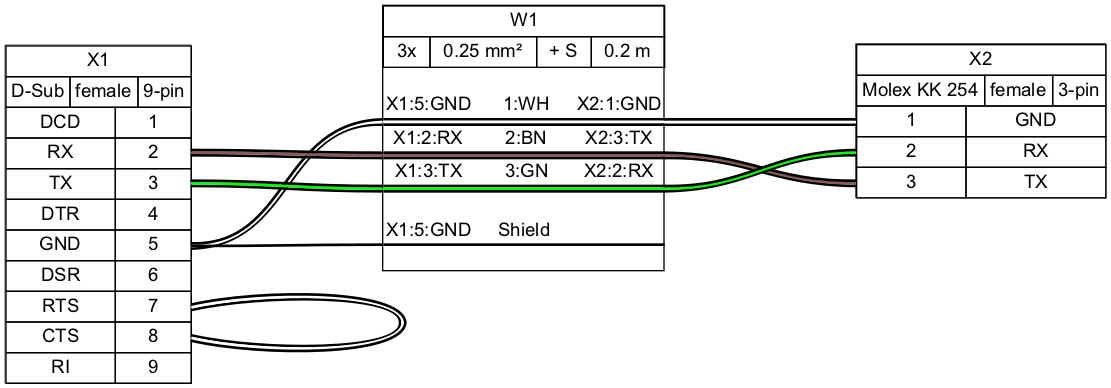
Demo 01
connectors:
  X1:
    type: D-Sub
    subtype: female
    pinlabels: [DCD, RX, TX, DTR, GND, DSR, RTS, CTS, RI]
  X2:
    type: Molex KK 254
    subtype: female
    pinlabels: [GND, RX, TX]

cables:
  W1:
    gauge: 0.25 mm2
    length: 0.2
    color_code: DIN
    wirecount: 3
    shield: true

connections:
  -
    - X1: [5,2,3]
    - W1: [1,2,3]
    - X2: [1,3,2]
  -
    - X1: 5
    - W1: s
Output file:
Bill of Materials (auto-generated)
Demo 02
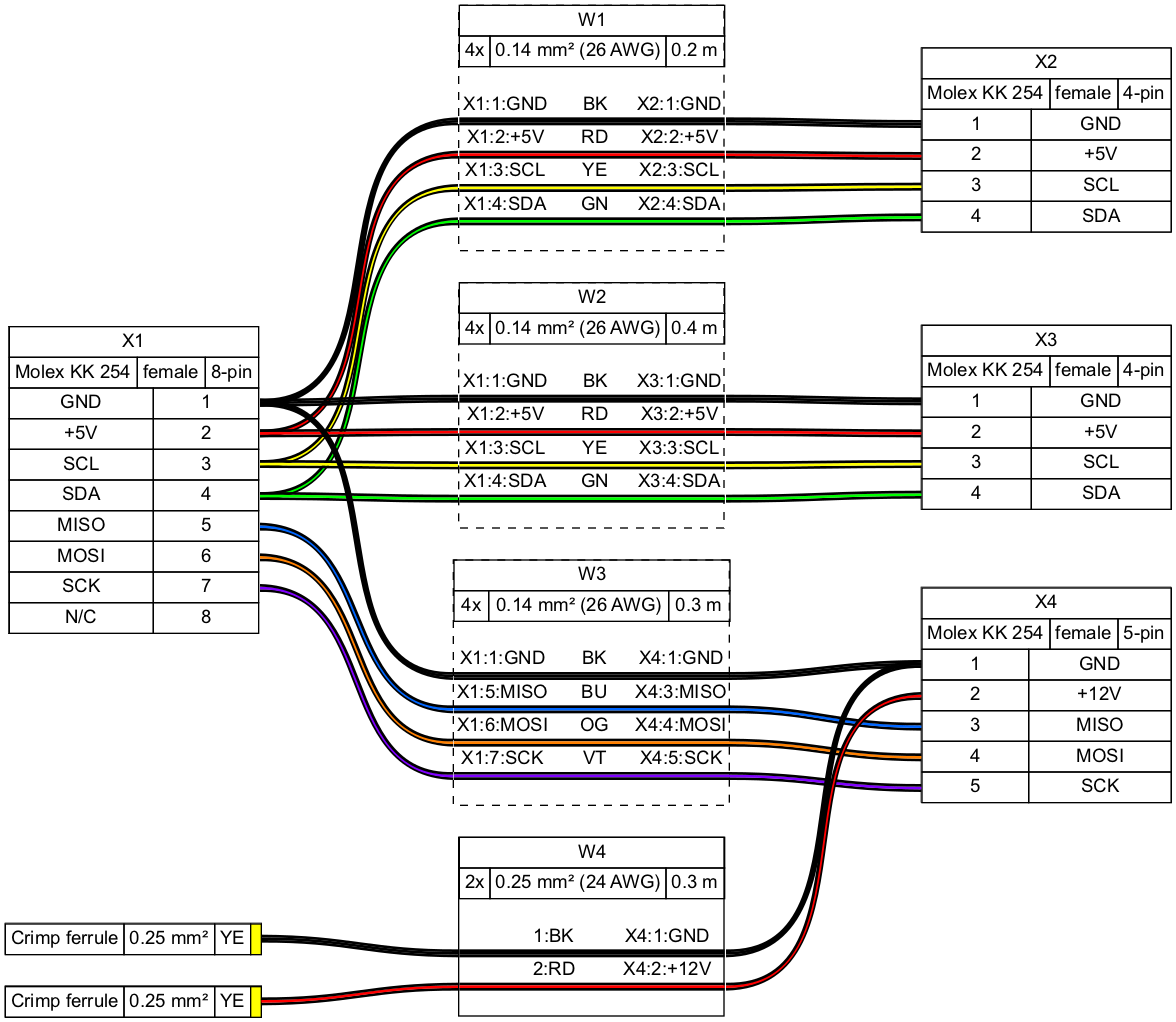
Syntax, tutorial and example gallery
Read the syntax description to learn about WireViz' features and how to use them.
See the tutorial page for sample code, as well as the example gallery to see more of what WireViz can do.
Usage
Installation
Requirements
WireViz requires Python 3.7 or later.
WireWiz requires GraphViz to be installed in order to work. See the GraphViz download page for OS-specific instructions.
Note: Ubuntu 18.04 LTS users in particular may need to separately install Python 3.7 or above, as that comes with Python 3.6 as the included system Python install.
Installing the latest release
The latest WireViz release can be downloaded from PyPI with the following command:
pip3 install wireviz
Installing the development version
Access to the current state of the development branch can be gained by cloning the repo and installing manually:
git clone <repo url>
cd <working copy>
git checkout dev
pip3 install -e .
If you would like to contribute to this project, make sure you read the contribution guidelines!
How to run
$ wireviz ~/path/to/file/mywire.yml
Depending on the options specified, this will output some or all of the following files:
mywire.gv         GraphViz output
mywire.svg        Wiring diagram as vector image
mywire.png        Wiring diagram as raster image
mywire.bom.tsv    BOM (bill of materials) as tab-separated text file
mywire.html       HTML page with wiring diagram and BOM embedded
Wildcars in the file path are also supported to process multiple files at once, e.g.:
$ wireviz ~/path/to/files/*.yml
To see how to specify the output formats, as well as additional options, run:
$ wireviz --help
(Re-)Building the example projects
Please see the documentation of the build_examples.py script for info on building the demos, examples and tutorial.
Changelog
See CHANGELOG.md
Status
This is very much a work in progress. Source code, API, syntax and functionality may change wildly at any time.