 Ryan Malloy
ac6977a105
Ryan Malloy
ac6977a105
- query_point: reverse-maps pixel RGB through colormap to recover exact
  data values at geographic coordinates
- get_time_series: fetches imagery across evenly-spaced dates for
  temporal analysis (up to 12 frames)
- Auto-detect polar stereographic projection (EPSG:3413/3031) for
  high-latitude bounding boxes
- Add progress reporting to all HTTP-calling tools
- Add quantitative_snapshot and seasonal_timelapse prompts
- Update README with 3 new conversational examples
- 92 tests passing
17 KiB
mcgibs
NASA Earth science visualizations for LLMs.
An MCP server that connects language models to NASA GIBS (Global Imagery Browse Services) — 1000+ visualization layers covering satellite imagery, scientific data products, and derived Earth observations, updated daily.
Three pillars:
- Discovery — search layers by keyword, browse measurement categories, check date availability
- Visualization — fetch imagery and data products by place name and date, compare dates side-by-side, composite multiple layers
- Interpretation — natural-language colormap explanations, legend graphics, scientific context
No API key required. All data is freely available from NASA.
Quick Start
From PyPI
uvx mcgibs
Add to Claude Code
claude mcp add mcgibs -- uvx mcgibs
Local development
git clone https://git.supported.systems/mcp/mcgibs.git
cd mcgibs
uv sync --all-extras
uv run mcgibs
Or add a local dev server to Claude Code:
claude mcp add mcgibs-local -- uv run --directory /path/to/mcgibs mcgibs
Tools
| Tool | Description |
|---|---|
search_gibs_layers |
Search 1000+ layers by keyword, measurement, period, or status |
get_layer_info |
Full metadata for a layer — instrument, platform, resolution, dates |
list_measurements |
All measurement categories with layer counts |
check_layer_dates |
Available date range for a layer (capabilities + live DescribeDomains) |
get_imagery |
Fetch a visualization by layer, date, and place name or bbox |
compare_dates |
Side-by-side comparison of two dates for change detection |
get_imagery_composite |
Overlay up to 5 layers into a single composite image |
explain_layer_colormap |
Natural-language explanation of what colors represent |
get_legend |
Pre-rendered legend graphic for a layer |
query_point |
Get the exact data value at a coordinate by reverse-mapping the pixel color through the layer's colormap |
get_time_series |
Fetch imagery across multiple dates for temporal analysis (up to 12 frames) |
resolve_place |
Geocode a place name to coordinates and bounding box |
build_tile_url |
Construct a direct WMTS tile URL for embedding |
Resources
| URI | Description |
|---|---|
gibs://catalog |
Full layer catalog grouped by measurement category |
gibs://layer/{layer_id} |
Individual layer metadata as JSON |
gibs://colormap/{layer_id} |
Colormap explanation for a layer |
gibs://dates/{layer_id} |
Available date range for a layer |
gibs://projections |
Supported GIBS projections and endpoints |
Prompts
| Prompt | Parameters | Description |
|---|---|---|
earth_overview |
(none) | Introduction to GIBS with suggested explorations |
investigate_event |
event_type, location, date |
Guided workflow for investigating natural events |
satellite_snapshot |
place, date |
Quick satellite view of any location |
climate_monitor |
indicator, location, start_date, end_date |
Track climate changes over time |
layer_deep_dive |
layer_id, location, date |
Full scientific analysis of a single layer |
multi_layer_story |
topic, location, date |
Data journalism — composite layers to tell a story |
polar_watch |
pole, date, compare_date |
Arctic/Antarctic ice and snow monitoring |
quantitative_snapshot |
layer_id, locations, date |
Query exact data values at specific coordinates |
seasonal_timelapse |
layer_id, location, start_date, end_date |
Track visual changes across multiple dates |
Conversational Examples
These examples show what interacting with mcgibs looks like from any MCP client. Tool calls and responses are abbreviated for readability. All images below were fetched live from NASA GIBS using the mcgibs MCP tools.
"What's happening in the Amazon right now?"
Try this with the satellite_snapshot prompt: place="Amazon Rainforest"
You: Show me what the Amazon rainforest looks like from space today.
The assistant resolves the location, fetches true color imagery, and searches for relevant science layers:
→ resolve_place("Amazon Rainforest")
  {"display_name": "Amazon Rainforest", "lat": -3.46, "lon": -62.21,
   "bbox": {"west": -73.98, "south": -16.52, "east": -43.75, "north": 5.27}}

→ get_imagery("MODIS_Terra_CorrectedReflectance_TrueColor", "2025-08-01",
              place="Amazon Rainforest")
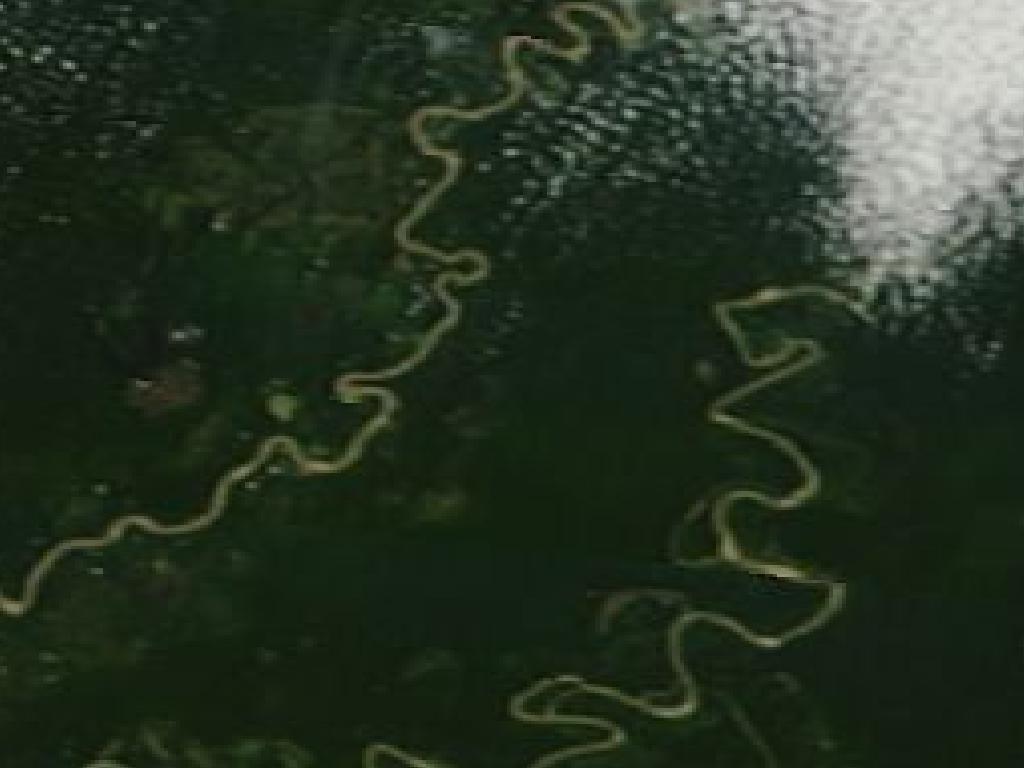
MODIS Terra Corrected Reflectance — Amazon Basin, 2025-08-01
→ search_gibs_layers("vegetation")
  Found 12 layer(s) matching 'vegetation':
    MODIS_Terra_NDVI_8Day
      MODIS/Terra Vegetation Index (NDVI), 8-Day — from 2000-02-18 (8-Day)
      [has colormap]
    ...
Assistant: Here's the Amazon from MODIS Terra — the river system is clearly visible, threading through dense canopy with sediment-laden water distinguishable from the dark forest. Some cloud cover is visible in the upper right. I also found vegetation index layers. Want me to overlay NDVI to show vegetation density, or check for fire/deforestation activity?
Understanding what the colors mean
Try this with the layer_deep_dive prompt: layer_id="AIRS_L3_Surface_Air_Temperature_Daily_Day"
You: What does the AIRS surface temperature layer actually show?
The assistant fetches metadata, the colormap interpretation, and sample imagery:
→ get_layer_info("AIRS_L3_Surface_Air_Temperature_Daily_Day")
  {"identifier": "AIRS_L3_Surface_Air_Temperature_Daily_Day",
   "title": "Surface Air Temperature (Day, Daily)",
   "instrument": "AIRS", "platform": "Aqua",
   "period": "Daily", "ongoing": true,
   "time": {"start": "2002-08-30", "end": null}}

→ explain_layer_colormap("AIRS_L3_Surface_Air_Temperature_Daily_Day")
  Surface Air Temperature (K):
    - light blue = below 200 K (-73.1 C) -- extreme cold
    - purple = ~230 K (-43.4 C) -- extreme cold
    - blue = ~260 K (-13.4 C) -- cold
    - orange = ~290 K (17.1 C) -- mild
    - magenta = above 320 K (46.9 C) -- extreme heat
  Color gradient runs from light blues (low values) through blues to magentas (high values).
  (242 color stops total, 5 key values shown)
  Transparent / no-data: No Data

→ get_imagery("AIRS_L3_Surface_Air_Temperature_Daily_Day", "2025-07-15",
              bbox=[-180, -90, 180, 90])
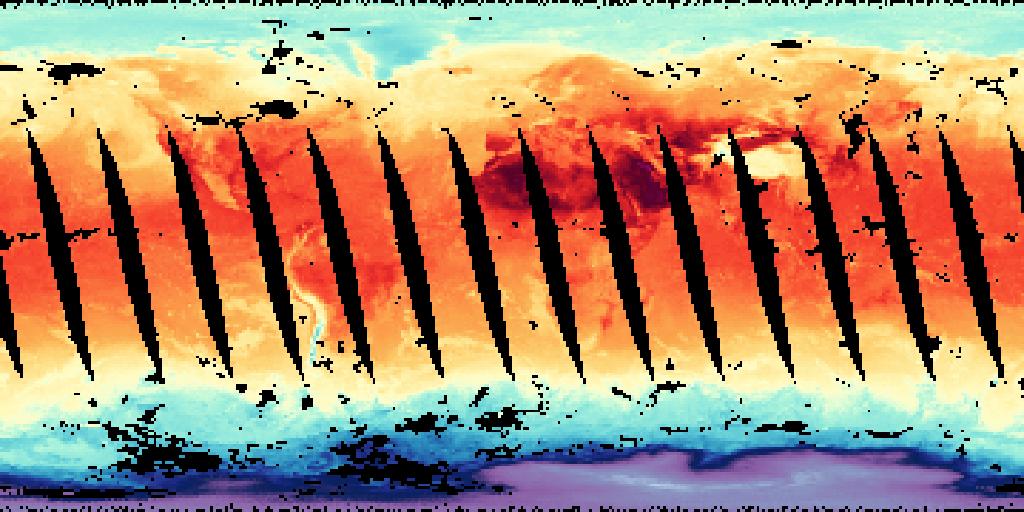
AIRS Surface Air Temperature — global view, 2025-07-15. Black diagonal gaps are orbital swaths where the satellite hadn't passed yet.
→ get_legend("AIRS_L3_Surface_Air_Temperature_Daily_Day")
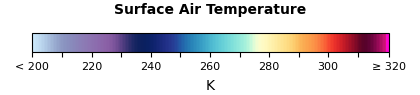
Assistant: The AIRS instrument on NASA's Aqua satellite measures surface air temperature globally every day, and has been doing so since August 2002. The colormap runs from light blue (below -73°C, Antarctic interior) through purples and blues (cold/freezing) to orange (mild, ~17°C) and magenta (above 47°C, Saharan extremes). The diagonal black stripes are orbital gaps — the satellite covers the full globe but not all locations on the same day pass. Areas with no valid retrieval show as transparent.
Tracking change over time
Try this with the climate_monitor prompt: indicator="sea ice", location="Arctic", start_date="2025-03-01", end_date="2025-09-01"
You: How has Arctic sea ice changed between winter and summer this year?
The assistant uses the climate_monitor workflow — search, verify dates, compare:
→ search_gibs_layers("sea ice concentration")
  Found 8 layer(s) matching 'sea ice concentration':
    AMSRU2_Sea_Ice_Concentration_12km
      Sea Ice Concentration (12 km, AMSRU2, GCOM-W1) — from 2012-07-02 (Daily)
      [has colormap]
    ...

→ compare_dates("AMSRU2_Sea_Ice_Concentration_12km",
                "2025-03-01", "2025-09-01",
                bbox=[-180, 60, 180, 90])
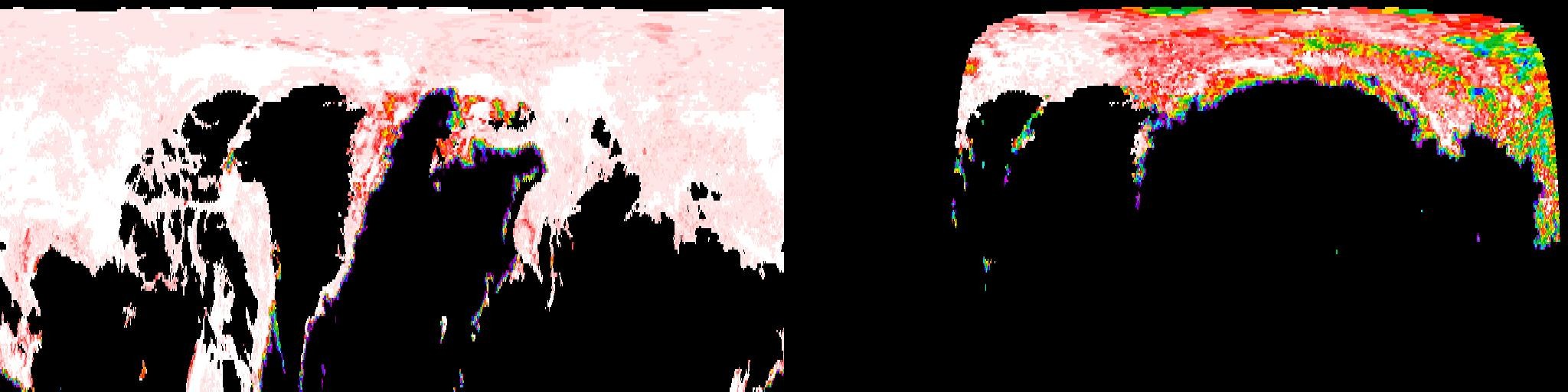
AMSRU2 Sea Ice Concentration — Left: March 2025 (winter maximum) | Right: September 2025 (summer minimum). White/pink = high concentration, colorful edges = ice margin with varying concentration, black = open water or land.
Assistant: The side-by-side view is striking. In March (left), the Arctic Ocean shows near-complete ice coverage — white and pale pink across the entire basin, with the ice edge extending well into the Bering Sea and Barents Sea. By September (right), the ice has retreated dramatically — the remaining pack ice is confined to a much smaller core around the pole, with extensive open water (black) visible along the entire Russian coastline and into the Canadian Archipelago. The colorful fringe along the ice edge shows the marginal ice zone where concentration drops from solid pack to scattered floes.
Compositing layers to tell a story
Try this with the investigate_event prompt: event_type="wildfire", location="Los Angeles", date="2025-01-08"
You: Can you show me how wildfire smoke from the 2025 LA fires affected air quality?
The assistant searches for complementary layers, checks dates, and builds a composite:
→ search_gibs_layers("aerosol")
  Found 8 layer(s) matching 'aerosol':
    MODIS_Terra_Aerosol_Optical_Depth
      MODIS/Terra Aerosol Optical Depth — from 2000-02-24 (Daily)
      [has colormap]
    ...

→ search_gibs_layers("fire thermal")
  Found 4 layer(s) matching 'fire thermal':
    MODIS_Fires_Terra
      MODIS/Terra Thermal Anomalies and Fire — from 2000-02-24 (Daily)
      [has colormap]
    ...

→ get_imagery_composite(
    ["MODIS_Terra_CorrectedReflectance_TrueColor",
     "MODIS_Terra_Aerosol_Optical_Depth"],
    "2025-01-08", place="Los Angeles")
  [composite image: true color with aerosol optical depth overlay]

→ explain_layer_colormap("MODIS_Terra_Aerosol_Optical_Depth")
  Aerosol Optical Depth:
    - yellow-green = ~0.15 (clean air)
    - orange = ~0.55 (moderate haze)
    - dark red = ~1.0 (thick smoke/dust)
  ...
Assistant: The composite overlay tells the story clearly. Over the LA basin, the true color base shows a visible smoke plume extending southwest over the Pacific. The aerosol optical depth overlay confirms it — the orange-to-red values (0.5-1.0) directly over the fire zone indicate thick particulate loading, fading to yellow-green (0.15, clean air) further out over the ocean. The fire thermal anomaly layer pinpoints the active burn areas as bright red hotspots in the foothills.
Querying exact values at a point
Try this with the quantitative_snapshot prompt: layer_id="AIRS_L3_Surface_Air_Temperature_Daily_Day", locations="Tokyo, Sydney, Sahara Desert", date="2025-07-15"
You: What's the actual surface temperature in Tokyo, Sydney, and the Sahara right now?
The assistant queries exact data values by reverse-mapping pixel colors through the layer's colormap:
→ explain_layer_colormap("AIRS_L3_Surface_Air_Temperature_Daily_Day")
  Surface Air Temperature (K):
    - light blue = below 200 K (-73.1 C)
    - blue = ~260 K (-13.4 C)
    - orange = ~290 K (17.1 C)
    - magenta = above 320 K (46.9 C)
  (242 color stops total, 5 key values shown)

→ query_point("AIRS_L3_Surface_Air_Temperature_Daily_Day", "2025-07-15",
              lat=35.68, lon=139.69)
  {"value": 299.2, "units": "K", "converted": "26.1 C",
   "color": "orange", "quality": "exact",
   "description": "mild"}

→ query_point(..., lat=-33.87, lon=151.21)
  {"value": 282.8, "units": "K", "converted": "9.6 C",
   "color": "blue", "quality": "exact",
   "description": "near freezing"}

→ query_point(..., lat=25.0, lon=25.0)
  {"value": 304.8, "units": "K", "converted": "31.6 C",
   "color": "red", "quality": "exact",
   "description": "hot"}
Assistant: Here are the AIRS-measured surface air temperatures for July 15, 2025:
Location Temperature Condition Tokyo 26.1°C (299.2 K) Mild summer day Sydney 9.6°C (282.8 K) Cool — it's winter in the Southern Hemisphere Sahara 31.6°C (304.8 K) Hot, typical for desert in July These come from the Atmospheric Infrared Sounder (AIRS) on NASA's Aqua satellite. The resolution is about 0.5°C — each of the 242 colormap entries covers a narrow value range, so the reverse-mapped pixel color gives an exact match to the original data.
Watching a season unfold
Try this with the seasonal_timelapse prompt: layer_id="MODIS_Terra_NDVI_8Day", location="Great Plains, USA", start_date="2025-03-01", end_date="2025-09-01"
You: Show me how vegetation changes across the US Great Plains from winter to summer.
The assistant fetches a sequence of images at regular intervals:
→ search_gibs_layers("NDVI")
  MODIS_Terra_NDVI_8Day
    MODIS/Terra Vegetation Index (NDVI), 8-Day — from 2000-02-18 (8-Day)
    [has colormap]

→ explain_layer_colormap("MODIS_Terra_NDVI_8Day")
  Vegetation Index (NDVI):
    - tan/brown = ~0.1 (bare soil, dormant vegetation)
    - yellow-green = ~0.3 (sparse vegetation)
    - green = ~0.6 (moderate vegetation)
    - dark green = ~0.9 (dense, healthy vegetation)

→ get_time_series("MODIS_Terra_NDVI_8Day",
                  place="Great Plains USA",
                  start_date="2025-03-01",
                  end_date="2025-09-01",
                  steps=6)
  [6 images: Mar 1, Apr 13, May 25, Jul 6, Aug 17, Sep 1]
Assistant: The six frames tell a clear story of the growing season:
- March — The Plains are mostly tan/brown (NDVI ~0.1), winter dormancy. Only southern Texas shows hints of green.
- April — A flush of yellow-green creeps north from Oklahoma as winter wheat greens up.
- May — The green wave accelerates — Kansas and Nebraska shift to solid green (NDVI ~0.5) as corn and soybean planting peaks.
- July — Peak vegetation. The entire region is dark green (NDVI 0.7-0.9). Crop canopy is fully closed.
- August — Still green but beginning to yellow at the margins. Early harvest in southern counties.
- September — Harvest underway. The palette shifts back toward yellow-green and tan as crops are cut.
Polar ice in proper projection
Try this with the polar_watch prompt: pole="arctic", date="2025-09-01"
You: Show me the current state of Arctic sea ice — and use the right map projection.
The polar_watch prompt guides the assistant to use polar stereographic projection:
→ get_imagery("AMSRU2_Sea_Ice_Concentration_12km", "2025-09-01",
              bbox=[-180, 60, 180, 90],
              projection="3413")
  [image: Arctic sea ice in polar stereographic — circular view centered on the pole]

→ explain_layer_colormap("AMSRU2_Sea_Ice_Concentration_12km")
  Sea Ice Concentration (%):
    - dark blue = ~15% (scattered floes)
    - cyan = ~40%
    - light grey = ~70%
    - white = ~100% (solid pack ice)

→ build_tile_url("AMSRU2_Sea_Ice_Concentration_12km", "2025-09-01",
                 zoom=2, row=0, col=0, projection="3413")
  https://gibs.earthdata.nasa.gov/wmts/epsg3413/best/AMSRU2_Sea_Ice_Concentration_12km/...
Assistant: With polar stereographic projection (EPSG:3413), the Arctic is shown as a circular view centered on the North Pole — no more equirectangular distortion. The September minimum is clearly visible: solid pack ice (white, 100%) is confined to a shrinking core, surrounded by a wide margin of partial ice (blues and cyans, 15-40%). The embeddable WMTS tile URL is ready for dashboards or reports.
Projections
| EPSG | Description | Use case |
|---|---|---|
| 4326 | Geographic (WGS84) | Default — global coverage, most layers |
| 3857 | Web Mercator | Web map tiles, Leaflet/Mapbox integration |
| 3413 | Arctic Polar Stereographic | Arctic-focused imagery |
| 3031 | Antarctic Polar Stereographic | Antarctic-focused imagery |
Development
uv sync --all-extras

# Lint
uv run ruff check src/ tests/

# Tests
uv run pytest

# Build
uv build
Architecture
src/mcgibs/
  server.py       MCP server — tools, resources, prompts, middleware
  client.py       GIBS HTTP client — WMS, WMTS, colormaps, geocoding
  capabilities.py WMTS GetCapabilities parser and layer search
  colormaps.py    Colormap XML parser and natural-language interpreter
  models.py       Pydantic models — Layer, BBox, GeoResult, ColormapEntry
  constants.py    API endpoints, projections, tile matrix definitions
  geo.py          Bounding box math and geocoding helpers
License
Links
- NASA GIBS
- GIBS API Documentation
- Worldview — NASA's browser-based GIBS viewer
- FastMCP — the MCP framework powering this server
- Source